Real git state, not a guess
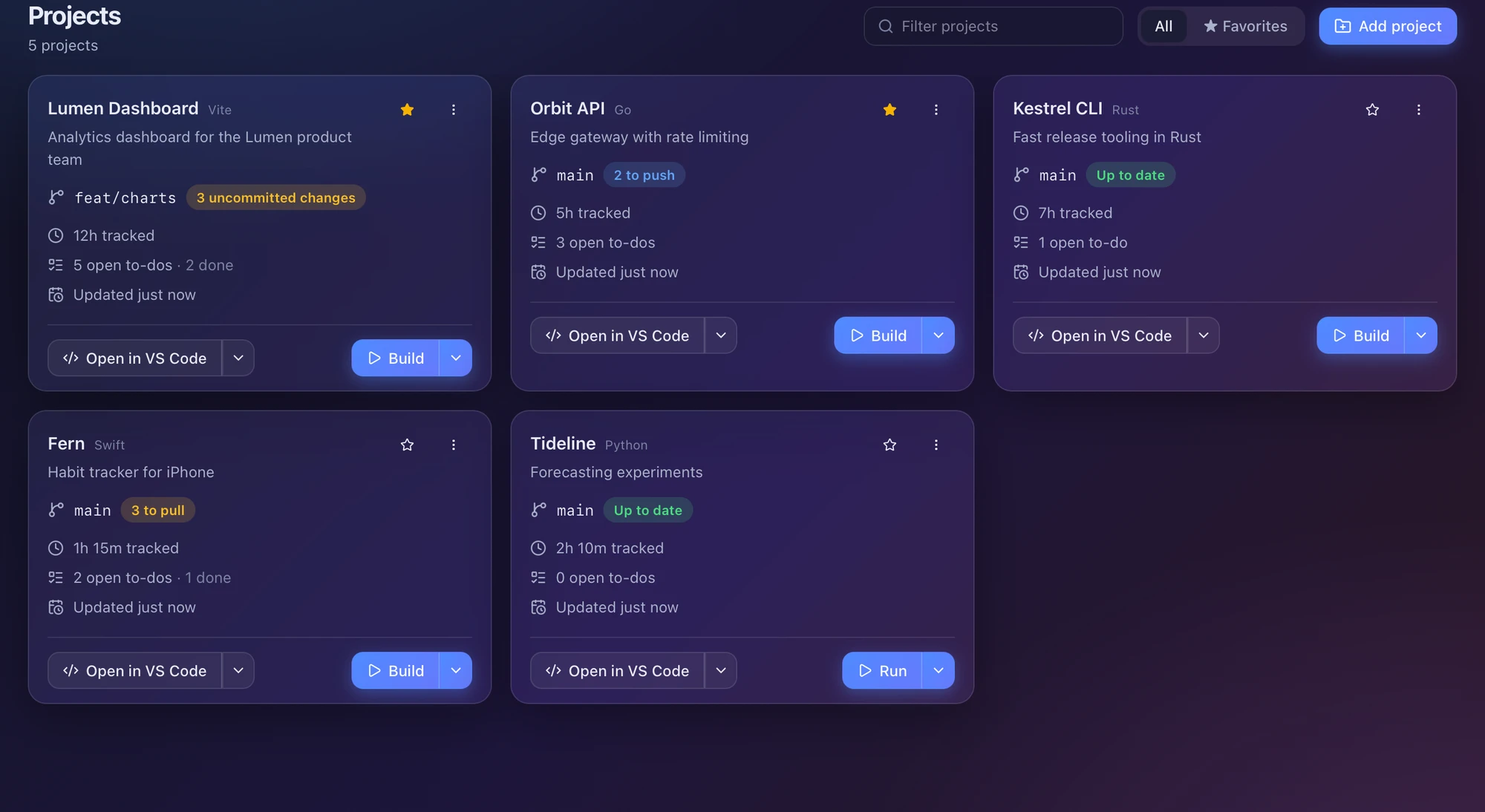
The branch your folder is on right now, and whether it is clean, ahead, behind, diverged or in conflict. Fetch, pull, push and stash straight from the card.
BluePhoenix is the project manager developers actually keep open: real git state, one-click builds, to-dos, time tracking and optional AI, for every folder you work in.
Free for macOS, Windows & Linux

Detects your stack and its commands automatically
The problem
Your work is spread across a dozen folders, three terminals, two editors and a notes app. Which branch were you on? What was left to do? How long did that take? BluePhoenix puts the answers on one dashboard.
Everything per project
Git, commands, tasks, notes, files and time, all one click from the dashboard.
The branch your folder is on right now, and whether it is clean, ahead, behind, diverged or in conflict. Fetch, pull, push and stash straight from the card.
Build, dev server, tests. Detected from your project and run in an embedded terminal.
~/lumen-dashboard
❯ pnpm run build
vite v7 building for production…
✓ 142 modules transformed.
✓ built in 1.84s
Priorities, due dates and notes for each project, with pages like Roadmap or Bugs.
Tap 15 min, 1 hour, 2 hours. No timers to forget.
It finds what you have installed. Set a default globally or per project.
Pick the last 30 commits or everything since a tag. Get release notes, a short summary or a pull-request description.
## v1.4.0 · 2026-10-18
### Added
- Chart legend with series toggles
### Fixed
- Axis labels overlapping below 480px
Track a university course, research or a design job with no folder at all. You still get to-dos, notes and time. And the Files tab lets you search and open anything in a real project.
How it fits
Four steps, none of them a ritual. BluePhoenix stays out of the way until you need an answer.
01
BluePhoenix reads the project: name, type, GitHub address and the commands it can run, from package.json scripts to Cargo, Makefile, Go, Gradle and more.
02
Each card shows the branch your folder is on right now and whether it is clean, ahead, behind, diverged or in conflict. It refreshes when you return to the window.
03
One click builds or starts the dev server. One more opens the folder in your editor or terminal. Fetch, pull and push never leave the card.
04
To-dos, Markdown notes and one-click time logging live inside every project, so “what was I doing here?” always has an answer.
Keyboard first
Jump to a project, push the branch you are on, log half an hour, open a terminal or flip the theme. Type, hit Enter, done.
Optional AI
Run it on your own machine or bring a cloud key. Nothing is sent until you press a button, and AI answers are always a suggestion you read first.
Generated from your staged changes.
Orders open work and says why.
Added, Changed, Fixed, Removed from your git history.
Turn a to-do into a ready-to-paste prompt.
Keys are stored in your system keychain (macOS Keychain, Windows Credential Manager, Linux Secret Service).
// Generate commit message
feat(charts): add series legend with per-series toggles
Adds a Legend component, wires it to the series store and hides the axis labels that overlapped on narrow screens.
Projects
Synced5 open · 12h
3 open · 5h
1 open · 7h
2 open · 1h 15m
iPhone companion
Sync uses a PostgreSQL database that you own. Neon’s free plan works great, and so does Supabase, Railway or your own server. Nobody else ever sees your projects.
Built with Tauri and Rust. Small, quick to open, light on memory.
Follows system light or dark, with five accent pairs. Real vibrancy on macOS and Windows.
Local database, keychain secrets and no telemetry of your projects. Files on disk are never touched.
No. It reads your folders and runs git and your own commands on your behalf. Removing a project only deletes BluePhoenix’s records, never anything on disk.
In a local database on your computer. API keys and your sync database address go into the system keychain. Nothing is sent anywhere until you press an AI button or turn on sync.
Yes. Download it from this site and use it. The installers are not signed with a paid certificate yet, so your system may ask you to confirm the first launch.
No. AI is entirely optional. Without it you still get git state, commands, to-dos, notes, time tracking and the command palette.
macOS 11+, Windows 10+ and Linux (AppImage and .deb). There is also an iPhone companion that syncs through your own database.
Free for macOS, Windows and Linux. Add your first folder in under a minute.
Free for macOS, Windows & Linux